How Long Does It Take to Install a CCTV System?
The Honest Answer — and Why It Depends on More Than Just Camera Count
If you have been searching for a straight answer to this question, you have probably already found a lot of vague responses. “A few hours.” “Half a day.” “It depends.” None of which actually helps you plan your week, arrange to be home, or decide whether a two-day job is worth the disruption.
So here is a practical, honest answer built on real-world experience from a Manchester-based CCTV installation company that carries out residential and commercial CCTV camera installation every single week.
The short version:
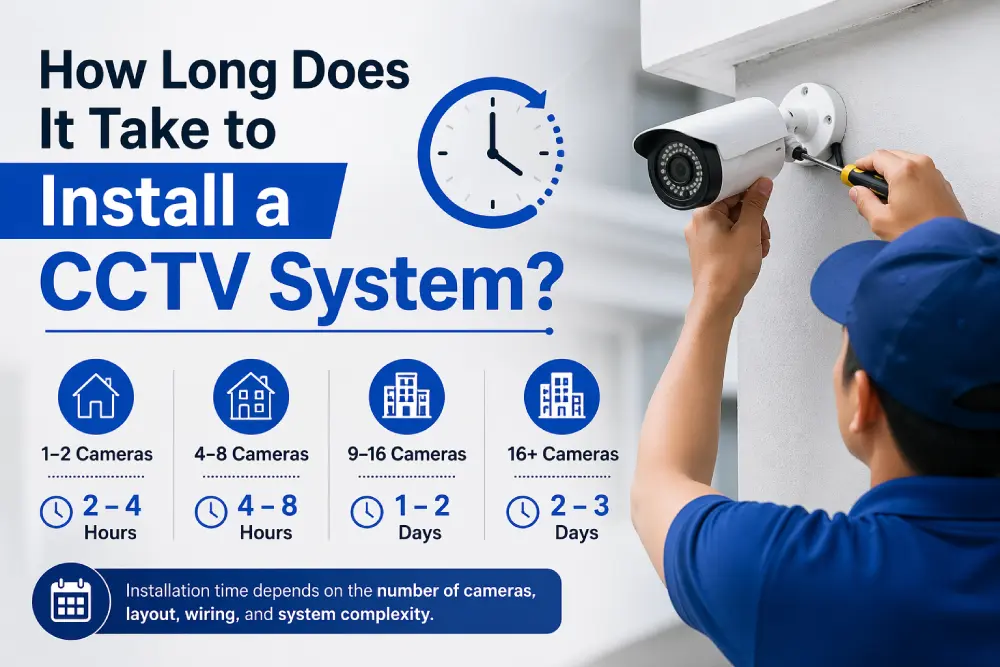
- A standard 2 to 4 camera home CCTV system: 3 to 6 hours
- A larger 6 to 8 camera home system: 6 to 8 hours (full day)
- A small commercial system (up to 8 cameras): 1 to 2 days
- A large commercial or multi-site system: 2 to 5+ days
But those numbers only tell half the story. The actual duration of your CCTV camera installation is shaped by at least eight different variables — all of which we are going to break down in detail below, so you know exactly what to expect before the engineer arrives.
The Eight Factors That Determine How Long CCTV Installation Takes
1. Number of Cameras
This is the most obvious factor, but the relationship is not as linear as people assume. Installing a second camera does not simply double the time of installing one — there is a significant fixed overhead of survey, cable routing planning, DVR/NVR setup, and mobile app configuration that happens regardless of camera count.
As a rough guide from our own installation experience:
| Number of Cameras | Typical Installation Time |
|---|---|
| 1 camera | 1.5 to 2.5 hours |
| 2 cameras | 2 to 4 hours |
| 4 cameras | 3 to 6 hours |
| 6 cameras | 5 to 7 hours |
| 8 cameras | 6 to 9 hours |
| 10+ cameras | Full day or more |
These are for straightforward residential properties with reasonable cable access. Commercial properties, listed buildings, or properties with complex layouts add significantly to these estimates.
2. Wired vs. Wireless Systems
This is the single biggest factor that affects installation time after camera count, and it is frequently underestimated.
Wired PoE (Power over Ethernet) systems — the professional standard that Nighthawk CCTV installs — require a Cat6 cable to be run from each camera back to the NVR location. On a straightforward new-build property with accessible loft space, this is relatively fast. On an older property with solid walls, limited loft access, or complex internal structure, each cable run becomes a significant task in itself. Cable routing through cavities, drilling through external walls, fitting conduit, and finishing cable entry points with weatherproof sealant all take time — but this is time well spent. A properly cabled system will perform reliably for a decade or more.
Wireless IP camera systems eliminate the cable runs entirely, which dramatically reduces installation time — sometimes by 50% or more. However, wireless systems are dependent on your Wi-Fi signal strength at each camera position, which may require router upgrades or Wi-Fi extenders. Battery-powered cameras also need periodic recharging, and the recording quality ceiling is lower than with wired systems.
For most permanent residential or commercial installations, we recommend wired systems despite the longer installation time. The reliability, image quality, and continuous recording capability are simply not achievable with wireless hardware.
3. Property Type and Construction
The construction of your property has a more significant impact on CCTV camera installation time than most people realise.
New-build properties are typically the fastest to wire. Accessible loft spaces, clean cavity walls, and pre-run conduit make cable routing straightforward. A four-camera system on a modern new-build can often be completed in three to four hours.
Older or Victorian properties with solid brick walls, lathe-and-plaster ceilings, stone construction, or limited loft access are significantly more challenging to cable. Each penetration through a solid wall requires appropriate drill bits, dust management, and careful finishing. Cable routing through solid internal walls may require surface-mount conduit rather than hidden cable runs. These jobs take longer — and the result is still worth doing correctly.
Listed buildings or properties with planning restrictions may have constraints on drilling, fixing brackets, or running visible conduit. In these cases, a pre-installation survey is essential to agree on appropriate methods before work begins.
Flats and apartments present their own challenges — particularly ground-floor or middle-floor units where cable runs to external camera positions may need to pass through communal areas or external fabric that requires building management permission.
4. Camera Mounting Positions and Heights
Where the cameras are being mounted matters enormously for installation time.
Cameras mounted at standard height on a two-storey house fascia board — reachable safely from a ladder — are straightforward to fit. Cameras requiring scaffold tower access, cherry picker hire, or specialist working-at-height equipment both add cost and add time to the project. If your property requires scaffold access for camera positioning, this is typically arranged as a separate element and will extend the overall project timeline.
Camera positions that require long cable runs — for example, a camera at the far end of a large rear garden, or a camera on an outbuilding 30 metres from the main property — take proportionally longer than positions close to the NVR location.
5. Location of the NVR or DVR
The recorder is the central hub of a CCTV camera installation — every camera cable must run back to it. Where the recorder is located in the property has a large influence on the total cable length required and therefore the installation time.
An NVR positioned in a central loft space allows for relatively short cable runs to cameras on all four elevations of the property. An NVR in a downstairs cupboard or utility room, with cameras on two storeys and all four sides of the property, requires significantly longer runs and more complex routing.
Before your installation day, discuss the proposed NVR location with your installer. Getting this right in the planning stage can save hours on the day.
6. Integration with Alarms and Other Systems
A standalone CCTV camera installation — cameras connected to a recorder, configured for remote viewing — is one scope of work. A system that integrates with your existing or new alarm system adds another layer of complexity.
At Nighthawk CCTV, we install Ajax wireless alarm systems and AX PRO wireless alarms alongside our CCTV installations. When both systems are being installed simultaneously, there are efficiencies — a single site survey, a single visit, coordinated cable routing — but the total installation time is naturally longer than for cameras alone. A combined CCTV and alarm installation for a residential property typically adds two to four hours to the project.
7. Setup, Configuration, and App Walkthrough
Physical installation — mounting cameras, running cables, connecting the recorder — is only part of what happens during a professional CCTV camera installation. The configuration stage that follows is just as important and is frequently underestimated in time estimates.
Configuration work includes:
- NVR setup: Channel assignment, recording schedule, motion detection sensitivity, storage retention period, time and date sync
- Firmware updates: Updating NVR and camera firmware to the latest version before handover
- Network configuration: Connecting the NVR to your router, assigning a static IP address or setting up DDNS for stable remote access
- Mobile app setup: Installing and configuring Hik-Connect (for Hikvision systems) or DMSS (for Dahua systems) on your smartphone and tablet, scanning the QR code, testing live view and playback
- Motion alert configuration: Setting alert zones, sensitivity levels, and push notification preferences
- Camera angle fine-tuning: Adjusting each camera’s position and angle once on-screen to confirm the field of view is correct
- Full system test: Triggering motion on each camera to confirm alerts, recording, and playback are all working correctly
- Customer walkthrough: Walking through the system operation with you — how to use the app, how to review recordings, how to adjust settings
This configuration stage typically takes 45 minutes to two hours depending on system size and complexity. A professional installer who skips this stage — hands you the equipment and leaves — is not doing their job properly. Do not accept a handover until you have seen the app working on your own phone and you have watched recordings playback successfully.
8. Access and Preparation on the Day
How ready your property is for the engineer’s arrival affects the installation timeline more than most people expect.
Clear access to the loft is one of the most commonly overlooked preparation points. If the loft hatch is boxed in, inaccessible, or packed with boxes directly underneath the hatch, this adds time immediately. Similarly, if the proposed NVR location is a cupboard that needs to be cleared, or a room that is not accessible, the engineer will need to wait or work around obstacles.
Where possible, confirm with your installer in advance:
- Which rooms and areas will need access
- Whether the loft is accessible and has a safe boarding arrangement
- Whether power sockets are available near the proposed NVR location
- Whether any furniture or storage needs to be moved before the engineer arrives
Good preparation reduces the working day — and a more efficient installation means a neater, more professional result.
A Step-by-Step Breakdown of What Happens on Installation Day
Understanding the sequence of a professional CCTV camera installation helps you plan your day and know what is happening at each stage.
Stage 1: Arrival and Pre-Work Survey (15–30 minutes)
The engineer arrives and carries out a brief on-site review of the agreed camera positions, cable routes, and NVR location. This is not the main survey — that will have been completed before installation day — but a confirmation that the plan agreed is still viable and that no access issues have arisen since the survey visit. Any last-minute adjustments to camera positions or routing are agreed before work begins.
Stage 2: NVR Positioning and Power (15–30 minutes)
The NVR or DVR is positioned in the agreed location and connected to mains power. If a hard drive needs to be installed inside the recorder before first use, this is done now. The recorder is powered on and the initial setup menus are worked through — language, time zone, and date/time settings — before cameras are connected.
Stage 3: Cable Routing (Variable — this is the longest stage)
For wired systems, this is where the bulk of the installation time is spent. The engineer routes cables from each camera position back to the NVR location, working through the loft, through wall cavities, or in surface conduit depending on the property. Each cable is labelled at both ends for future reference. Holes through external walls are drilled and sealed with appropriate weatherproof compound. Cable entry points into the property are fitted with appropriate grommets or escutcheons.
This stage can range from 30 minutes per camera on a straightforward new-build to 90 minutes per camera on a complex older property.
Stage 4: Camera Mounting and Connection (15–30 minutes per camera)
Brackets are fixed at each camera position, cables are dressed through the bracket, and the camera is connected and mounted. The engineer confirms each camera is powering on and producing a signal at the NVR before moving to the next position.
Stage 5: NVR Configuration and Network Setup (30–60 minutes)
With all cameras connected and visible on the recorder, the NVR is fully configured — recording schedules, motion detection settings, retention periods, firmware updated, and network connection established.
Stage 6: Remote Access and Mobile App Setup (20–40 minutes)
The app is downloaded on your phone, the NVR is added via QR code, and live view and playback are tested to confirm remote access is working correctly. Motion alerts are configured and a test trigger is performed to confirm you receive a push notification on your device.
Stage 7: Fine-Tuning, Testing, and Walkthrough (20–45 minutes)
Final camera angle adjustments are made with the NVR picture on a screen or phone as a reference. Every camera is tested for motion detection. The engineer walks you through the system operation — how to use the app, how to view recordings, and who to call if something is not working. A written handover note is left with your NVR admin credentials and Nighthawk CCTV’s contact details.
How Long Does Commercial CCTV Installation Take?
Commercial CCTV camera installation projects are scoped differently from residential installs, and the timeline varies considerably based on the size and complexity of the site.
Small retail units or offices (up to 8 cameras): Typically completed in one full day, often with two engineers working simultaneously to speed up cable routing. Configuration and handover happens on the same day.
Medium commercial sites (8–16 cameras): Usually two days. Day one covers cable routing and camera mounting; day two covers NVR configuration, integration with any alarm or access control systems, and full testing.
Large commercial or industrial sites (16+ cameras): These are project-managed individually. A site survey identifies every camera position, cable route, recording room location, and network infrastructure requirement. Installation is typically completed in two to five days with a team of engineers. Final commissioning and staff training may happen separately.
Retail and licensed premises have an additional consideration: minimising disruption to trading. Nighthawk CCTV can schedule commercial installations around trading hours — arriving before opening, working during quiet periods, or completing work over a weekend — to reduce impact on your business operations.
For all commercial work, a written service report is provided on completion confirming the system specification, camera positions, and configuration settings. This documentation is important for insurance, licensing compliance, and future maintenance records.
What Happens After the Installation?
CCTV camera installation day is the beginning of your security system’s life, not the end of the project. A few things happen in the days following installation that are worth knowing about.
The first 24–48 hours are worth checking the app a few times to confirm recordings are being stored correctly, that motion alerts are arriving when expected, and that the live view connects reliably. Occasionally, motion sensitivity needs a small adjustment after real-world testing — too sensitive and you receive constant alerts from passing cars or a swaying tree; too low and genuine events are missed. A quick call or message to your installer can resolve this.
After the first month, it is worth reviewing a short period of stored footage to confirm the system has been recording continuously without gaps. Hard drives are rated for continuous operation, but a brief check gives you confidence that storage is working as expected.
Annual CCTV maintenance is recommended for all systems. At Nighthawk CCTV, our CCTV maintenance service covers lens cleaning, camera angle checks, hard drive health testing, firmware updates, and remote access verification — everything needed to confirm your system is still performing at full capability twelve months after installation.
How to Prepare for Your CCTV Camera Installation Day
To help your installation go as smoothly and efficiently as possible, here is a practical preparation checklist.
Before the engineer arrives:
- Ensure the loft hatch is accessible and clear of obstruction directly beneath it
- Confirm a power socket is available near the proposed NVR location
- Move any furniture or storage that blocks walls where camera cables need to be routed
- Have your Wi-Fi router password available for network setup
- Download the relevant app to your phone in advance: Hik-Connect for Hikvision, DMSS for Dahua
On the day:
- Be available throughout the installation to answer questions about camera positions and cable routing preferences
- Let the engineer know if you have preferences about how visible surface conduit should be where hidden cable runs are not possible
- Check each camera position as it is confirmed to make sure the coverage matches what you discussed in the survey
After the engineer leaves:
- Test the mobile app from a different Wi-Fi network or mobile data to confirm remote access works outside your home
- Save the NVR admin credentials somewhere secure
- Note the Nighthawk CCTV contact number for any follow-up questions
Frequently Asked Questions About CCTV Installation Time
How long does CCTV installation take for a 4-camera home system?
For most UK homes with reasonable cable access and a straightforward property layout, a professional four-camera CCTV camera installation takes between three and six hours including full configuration and mobile app setup. New-build properties or homes with good loft access tend to be at the lower end of this range; older properties with solid walls or complex layouts at the higher end.
Can CCTV be installed in one day?
For residential properties and small commercial premises, yes — the vast majority of CCTV camera installation jobs are completed in a single visit. Larger commercial systems with ten or more cameras across complex cable routes typically require two days or more.
Do I need to be home during CCTV installation?
Yes. You need to be present throughout the installation to confirm camera positions and cable routing decisions as they arise, and to receive the system walkthrough and app setup at the end. The handover stage — where you learn how to use your system — is a critical part of the process.
Does wireless CCTV take less time to install than wired?
Significantly less, yes. Wireless camera installations eliminate cable routing entirely, which typically accounts for 40 to 60% of the total installation time on a wired system. However, wireless systems are dependent on Wi-Fi signal strength and do not support continuous 24/7 recording in the same way as wired PoE systems. For permanent, professional-grade security, wired CCTV camera installation is the right choice despite the longer installation time.
How far in advance do I need to book?
At Nighthawk CCTV, most residential installations are booked within one to two weeks of the initial enquiry. Commercial projects with complex scoping requirements may take slightly longer to plan and schedule. Use our free CCTV cost calculator to get an initial estimate, then call us on 0161 399 0348 to arrange a free survey and book your installation date.
Is a survey visit required before installation?
For anything beyond the simplest single-camera installation, a pre-installation site survey is strongly recommended. The survey allows the engineer to confirm camera positions, map cable routes, identify any access challenges, and specify the correct equipment before installation day. This means the installation runs more efficiently and there are no unexpected surprises on the day.
Will CCTV installation cause damage to my property?
Minimal. Professional CCTV camera installation involves drilling small holes through external walls for cable entry points, which are sealed with weatherproof compound. Brackets are fixed with appropriate fixings for the wall type. Where cables run through lofts or cavities, no visible work is left inside the property. Surface conduit is used only where hidden cable runs are not practical, and is fitted neatly using appropriate fixings and covers. Nighthawk CCTV engineers take care to work cleanly and leave the property tidy.
Book Your CCTV Camera Installation in Manchester
Whether you need a simple two-camera home setup or a complete commercial surveillance system, Nighthawk CCTV handles the entire process — from free site survey through to installation, configuration, and ongoing maintenance.
We carry out professional CCTV camera installation across Greater Manchester and surrounding areas, including Salford, Stockport, Bury, Rochdale, Oldham, Bolton, Ashton-under-Lyne, Middleton, Whitefield, Eccles, Altrincham, Trafford, and all towns within a 50-mile radius.
📞 Call us: 0161 399 0348
✉️ Email: info@nighthawkcctv.co.uk
🧮 Estimate your installation cost →
📋 Book a free site survey →
Related Articles & Services: Home CCTV Installation Manchester · Commercial CCTV Installation · CCTV Maintenance & Servicing · Hikvision CCTV Systems · Dahua CCTV Systems · Ajax Alarm Systems · CCTV Cost Calculator