How to Watch CCTV Camera from Anywhere Using the Internet?
Imagine being sat in a café in Spain, pulling out your phone, and checking live footage of your front door back in Manchester — all in under 30 seconds. That’s the reality of modern CCTV remote viewing, and it’s far simpler to set up than most people think.
Whether you’re a homeowner wanting to keep an eye on your property, or a business owner who needs visibility across multiple sites, this guide covers everything you need to know about watching your CCTV cameras remotely in 2026 — from the basics right through to security best practices.
What Is CCTV and How Does Remote Viewing Work?
CCTV stands for Closed-Circuit Television. Unlike broadcast television, the footage stays within a closed network — transmitted only to designated monitors, recorders, or authorised devices. It’s been the backbone of property security for decades.
What’s changed dramatically in recent years is how you access that footage. Today’s CCTV systems are internet-connected, cloud-ready, and built with remote viewing in mind. Most modern IP cameras can be accessed from your smartphone in a matter of minutes — no IT degree required.
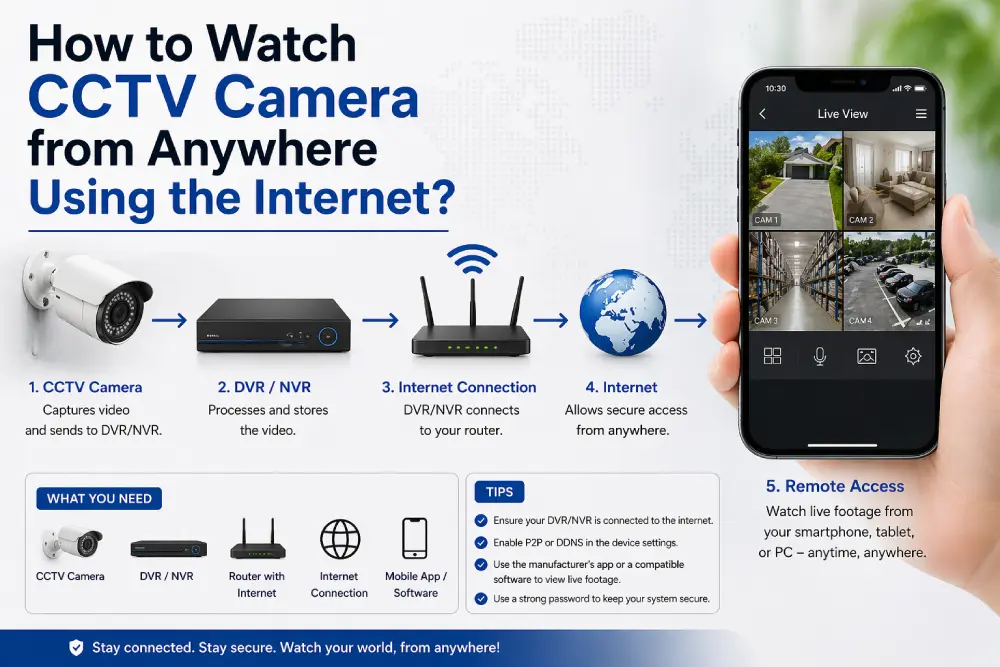
Here’s a simple way to think about how it works:
- Your camera or recorder connects to your home or business router
- That router gives the device access to the internet
- You connect to it remotely via an app, web browser, or cloud portal
- You watch your live feed or recorded footage from anywhere in the world
Can You Watch CCTV Cameras Remotely? (The Short Answer)
Yes — absolutely. Whether you have a brand-new IP camera system or an older DVR-based setup, remote access is possible. Modern systems make it easier than ever, but even legacy systems can be configured for internet access through a network-enabled DVR or NVR.
The method you use will depend on your equipment, but the good news is: there are several options, ranging from dead simple to more technically involved.
5 Ways to Watch Your CCTV Cameras from Anywhere in 2026
1. Mobile App — The Easiest Method (Most Recommended)
This is how the vast majority of homeowners and small businesses do it in 2026 — and for good reason. It’s quick, free, and works brilliantly.
Most major CCTV brands have their own dedicated apps:
- Hikvision → Hik-Connect (iOS & Android)
- Dahua → DMSS (iOS & Android)
- Reolink → Reolink App (iOS & Android)
- Axis → AXIS Mobile Viewer
How it works:
- Connect your camera or NVR/DVR to your router
- Download the brand’s app from the App Store or Google Play
- Add your device (usually via QR code scan or UID number)
- Log in and watch your live feed from anywhere
That’s genuinely it. Most people are up and running within 10 minutes.
2. P2P (Peer-to-Peer) via UID — No Network Config Needed
P2P technology is what makes modern camera apps so straightforward. Instead of needing to know your IP address or configure your router, your camera is assigned a unique ID number (UID). The app uses this ID to connect directly to your device via the manufacturer’s cloud relay.
This is the default method used by Hikvision, Dahua, Reolink, and most major brands in 2026. If you’re using a modern system, you’re likely already using P2P without even realising it.
3. Cloud-Based CCTV — Best for New Setups
Cloud CCTV is increasingly popular in 2026, especially for users who want a clean, hardware-light solution. Your footage is recorded and stored on secure remote servers, and you access everything — live and recorded — through a web portal or app.
Benefits:
- No DVR or NVR required
- Easy setup with minimal technical knowledge
- Footage is protected even if your camera is stolen or damaged
- Access from any device, anywhere
The trade-off is a monthly subscription fee for cloud storage. But for many users, the simplicity is well worth it.
4. Web Browser Access — Great for Desktop Viewing
If you prefer to watch your cameras on a laptop or desktop, most modern systems let you access footage directly through a web browser — Chrome, Firefox, or Safari. You’ll typically enter your camera’s IP address or DDNS hostname into the address bar and log in with your credentials.
This method is especially useful if you want to monitor multiple cameras on a large screen without installing any software.
5. Port Forwarding — For Advanced Users
Port forwarding is a more technical method that gives you direct access to your CCTV system via your router. You open a specific port on your router and link it to your DVR or NVR, then access the system using your router’s public IP address.
Because most internet service providers assign dynamic IP addresses (meaning they change), you’ll also want to set up a DDNS (Dynamic DNS) service. This gives your system a fixed domain name (like yourhome.ddns.net) that always points to your current IP address — so you don’t have to keep checking and updating it.
Important: Port forwarding creates an opening in your network. If you go this route, make sure you’re using strong passwords, updated firmware, and ideally a VPN on top.
Step-by-Step: How to Set Up CCTV Remote Viewing
Here’s a practical walkthrough for getting started with app-based remote viewing (the recommended method for most users):
- Connect your camera or NVR/DVR to your router using an Ethernet cable or Wi-Fi
- Power on the system and ensure it has a stable internet connection
- Download your camera brand’s official app from the App Store or Google Play
- Create an account within the app if prompted
- Add your device — most systems let you scan a QR code on the camera or recorder
- Enter your login credentials and verify the connection
- Enable push notifications so you get alerted to motion or unusual activity
- Turn on two-factor authentication (2FA) for secure access
Once set up, you can watch live footage, review recordings, and receive alerts — all from your phone, wherever you are.
How to Install a CCTV System from Scratch
If you’re starting from the beginning, here’s how a professional installation typically works. This gives you a clear picture of what’s involved — whether you’re doing it yourself or working with an installer.
Step 1 — Plan your coverage Think about which areas matter most: front and back doors, driveways, garages, car parks, and any known blind spots. A good CCTV plan starts with a simple sketch of your property.
Step 2 — Choose the right equipment In 2026, IP cameras are the gold standard. They offer higher resolution (4K is now standard), better low-light performance, and built-in remote viewing support. For recording, an NVR (Network Video Recorder) is used with IP cameras, while a DVR (Digital Video Recorder) is used with older analogue cameras.
Step 3 — Mount your cameras Position cameras at 2.5–3 metres height for the best coverage angle and to make them harder to tamper with. Make sure each camera has a clear, unobstructed view of the area you want to monitor.
Step 4 — Connect the cameras Wired systems use Cat5e or Cat6 Ethernet cables, often with PoE (Power over Ethernet) so the camera receives both power and data through a single cable. Wireless cameras connect to your Wi-Fi network.
Step 5 — Set up your recorder Connect your NVR or DVR to a monitor, configure recording schedules, set motion detection zones, and adjust video quality settings.
Step 6 — Configure remote viewing Follow the steps in the section above to set up app-based remote access. Your installer can do this for you if needed.
Step 7 — Test everything Walk around your property. Check camera angles, verify night vision is working, watch a clip of recorded footage, and confirm you can access the live feed remotely from your phone.
For complex installations, multi-camera setups, commercial properties, or high-security sites, we always recommend using a professional installer. The cost of getting it wrong far outweighs the cost of doing it right the first time.
Keeping Your CCTV Secure: What Most People Overlook
Here’s a truth that doesn’t get talked about enough: an insecure CCTV system is a liability, not just an asset. Poorly configured cameras have been compromised by hackers in high-profile incidents in the UK and worldwide.
The good news is that protecting yourself is straightforward:
Change default passwords immediately. Every camera ships with a default username and password (often admin/admin). Change these the moment you set up your system.
Enable two-factor authentication (2FA). Available on most major CCTV apps in 2026 — it adds a second layer of protection if your password is ever compromised.
Keep firmware up to date. Manufacturers regularly release updates that patch security vulnerabilities. Set your system to update automatically where possible.
Avoid unverified third-party apps. Stick to your camera manufacturer’s official app. Free third-party alternatives may lack encryption or proper security auditing.
Use a VPN when accessing cameras on public Wi-Fi. Coffee shops, airports, and hotels are not secure networks. A VPN encrypts your connection and prevents snooping.
Review access logs periodically. Most modern systems let you see who has accessed your cameras and when. It’s worth checking occasionally for anything unusual.
Is Remote CCTV Legal in the UK?
Yes — installing and remotely viewing CCTV on your own property is perfectly legal in the UK. However, there are rules you need to follow:
- UK GDPR compliance: If your cameras capture footage of people in public spaces or neighbouring properties, you must comply with UK GDPR. This typically means registering with the ICO (Information Commissioner’s Office) and displaying signage.
- Signage: Clear, visible CCTV warning signs are required in most situations where cameras are visible to members of the public.
- Data retention: You should only keep recorded footage for as long as necessary — typically 30 days is considered standard for most residential and small business setups.
- Neighbours and public areas: Cameras should not be deliberately aimed at neighbouring properties or areas where individuals have a reasonable expectation of privacy.
If you’re unsure about compliance, the ICO website has straightforward guidance, or you can ask us — we’ve installed hundreds of systems across Greater Manchester and know the rules inside out.
Frequently Asked Questions
Q: Can I watch my CCTV cameras for free on my phone? Yes — most major brands including Hikvision and Dahua offer completely free apps. You’ll only pay if you opt for a cloud storage subscription, which is optional.
Q: What internet speed do I need for remote CCTV viewing? For smooth HD remote viewing, you’ll want an upload speed of at least 2–5 Mbps per camera at the location where the cameras are installed. The download speed at your viewing location (e.g. your phone on 4G) typically isn’t a limiting factor.
Q: Do I need a static IP address? Not necessarily. A DDNS service maps your changing IP address to a fixed domain name, so you can access your system without needing a static IP. However, if you use P2P or cloud-based viewing via an app, you don’t need to worry about IP addresses at all.
Q: What’s the difference between DVR and NVR? A DVR (Digital Video Recorder) works with traditional analogue cameras and uses coaxial cables. An NVR (Network Video Recorder) works with IP cameras and uses Ethernet cables. For any new installation in 2026, we’d recommend an NVR-based IP camera system.
Q: What happens to my CCTV footage if my broadband goes down? Your cameras will continue recording locally to the DVR/NVR — they don’t need internet to record. You’ll just lose remote viewing access until the connection is restored. Cloud-based systems may pause cloud uploads but often have local backup as well.
Q: What are the best CCTV brands for remote viewing in 2026? Hikvision and Dahua remain the market leaders, offering excellent apps, 4K resolution, AI-powered motion detection, and reliable remote access. Both brands are stocked and installed by NightHawk CCTV.
Ready to Set Up Remote CCTV Viewing?
At NightHawk CCTV, we handle everything — from designing your system to getting remote viewing working perfectly on your phone before we leave the job. We cover Manchester and the surrounding areas, and we work with both homeowners and businesses.
No jargon. No unnecessary upselling. Just a reliable system that works.
📞 Contact us today for a free, no-obligation quote →
💰 Use our CCTV Cost Calculator to get an instant estimate →
You Might Also Find These Useful
- Wireless CCTV Cameras: Find Your Perfect Security Solution
- CCTV Installation Cost: Your Complete 2026 Guide
- Outdoor Security Cameras — Installation and Free Guide
- Wireless vs Wired CCTV Cameras for Home UK: Which Is Better?
NightHawk CCTV is a professional CCTV installation company based in Manchester, UK. We specialise in Hikvision, Dahua, AJAX alarm systems, and smart security solutions for homes and businesses.