Choosing the Right CCTV Display Screen
When people think about a CCTV security system, they usually focus on the cameras, recorder, or mobile app. But one important part often gets ignored: the CCTV display screen.
A security system is only useful if you can actually see what is happening clearly. That is where the display screen plays a major role. It helps you monitor live footage, review recorded events, and respond quickly if something unusual happens on your property.
At NightHawk CCTV, we often see customers invest in quality cameras but overlook the importance of choosing the right monitor. In reality, a good display can improve the way your whole system performs. It helps you spot details better, monitor multiple camera views more comfortably, and make your security setup far more effective.
Whether you are a homeowner, landlord, shop owner, or business manager, understanding the role of a surveillance monitor can help you make a much better decision when building or upgrading your security system.
In this guide, we will explain what a CCTV display screen is, how it works, and why it matters so much for both homes and businesses.
What Is a CCTV Display Screen?
A CCTV display screen is the monitor used to show the footage captured by your CCTV cameras. It allows you to watch your property in real time and also review recordings when needed.
In a standard CCTV setup, cameras capture video footage and send it to a DVR or NVR recorder. The recorder processes that footage, and the display shows it visually. This means the screen acts as the viewing center of your entire security system.
Without a proper monitor, even high-quality cameras can lose their full value. If the screen is too small, too blurry, or poor in quality, it becomes much harder to identify faces, movement, number plates, or suspicious activity.
A high-quality screen helps you get the most from your surveillance system by showing clearer images and making monitoring easier.
In simple terms, cameras record the activity, but the monitor helps you understand what is actually happening. That is why it should never be treated as just an optional add-on.
Why a CCTV Display Screen Matters for Security
Many people assume that if the cameras are recording, the system is doing its job. But security is not just about recording footage. It is also about being able to see and react to what is happening.
Clearer footage means better awareness
A better monitor helps you notice important details much faster. Whether someone is approaching your entrance, moving near a gate, or entering a restricted area, a clear viewing screen gives you a stronger chance of spotting it early.
Faster response to incidents
If you can see something clearly, you can act more quickly. This is especially important for businesses, shops, warehouses, and larger homes where fast reactions can prevent theft, damage, or safety issues.
More reliable playback review
After an incident happens, recorded footage may need to be reviewed carefully. A good screen makes it easier to inspect details, zoom in on footage, and understand exactly what happened.
Improved multi-camera viewing
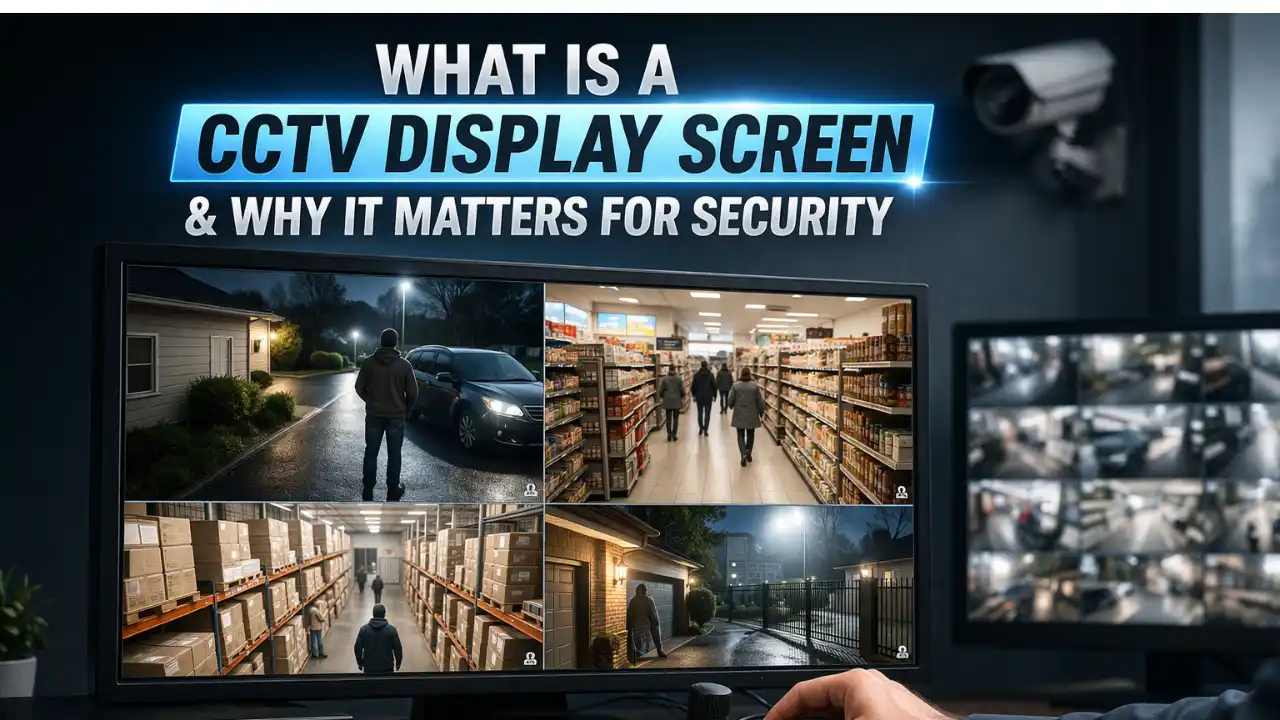
If your system uses several cameras, the display becomes even more important. A good monitor allows you to view multiple camera feeds at once without making everything look too small or unclear.
Better day-to-day monitoring
Security is not always about emergencies. Sometimes it is simply about checking deliveries, watching entrances, keeping an eye on staff areas, or seeing who is at the gate. A reliable screen makes daily monitoring much easier and more practical.
How a CCTV Display Screen Works in a Security Setup
To understand its importance properly, it helps to know where the display fits into the overall CCTV system.
A basic CCTV setup usually includes:
- CCTV cameras
- DVR or NVR recorder
- Cabling or network connection
- Storage device or hard drive
- Display screen or monitor
The cameras capture the video and send it to the recorder. The recorder then sends that video output to the screen, where you can watch live footage or recorded playback.
Depending on the system, the monitor may connect through HDMI, VGA, or other compatible ports. In modern systems, footage may also be viewed across several devices, including wall monitors, desktop screens, and mobile apps.
This makes the display more than just a monitor. It becomes one of the most practical and useful parts of your daily security setup.
Some advanced systems also allow split-screen viewing, motion-triggered alerts, remote playback, and easy switching between camera angles. When paired with the right monitor, these features become far more useful and easier to manage.
Main Types of CCTV Display Screens
There is no one-size-fits-all option when it comes to surveillance screens. The best choice depends on where the system is being used and how much monitoring is needed.
LED monitors
LED monitors are one of the most popular choices for CCTV use. They offer good brightness, strong clarity, and low power consumption. They are suitable for homes, offices, shops, and general commercial use.
LCD monitors
LCD monitors are also widely used and can work well for smaller CCTV setups. They are often affordable and available in many screen sizes.
Professional surveillance monitors
These are monitors designed specifically for CCTV and long-hour operation. They are built to stay on for extended periods and are ideal for businesses or locations that require constant monitoring.
Wall-mounted display screens
Wall-mounted screens are common in reception areas, retail environments, and security control rooms. They allow multiple people to monitor footage easily and create a more visible security presence.
Multi-screen monitoring setups
Larger businesses and high-security sites may use multiple monitors together. This makes it easier to separate live viewing, playback, and system controls across different screens.
Choosing the right type depends on how your property is monitored, how often the system is used, and whether the screen needs to support one feed or many at once.
Key Features to Look for in a CCTV Display Screen
Choosing the right display is not just about picking a screen that looks nice. It should match your CCTV system and support clear, comfortable monitoring.
High resolution
A higher-resolution monitor will show more detail. If your cameras record in HD or 4K, your screen should be able to display that quality properly.
Suitable screen size
The screen size should match how many camera feeds you want to watch at the same time. A small screen may be enough for one or two cameras, but larger systems need a larger display.
Good brightness and contrast
Security footage often includes darker areas, night vision views, and outdoor scenes. Good brightness and contrast help make these scenes easier to see.
Wide viewing angle
If more than one person will view the screen or if it will be installed in an open area, a wide viewing angle is useful.
Smooth playback performance
A screen that handles motion well is important when reviewing footage of people walking, cars moving, or activity at entrances and exits.
Correct connectivity ports
Always check whether the display supports the same connection type as your recorder, such as HDMI or VGA.
Built for longer use
If the monitor will be running for long periods each day, it should be reliable enough for that kind of use. This is especially important in commercial environments.
A good display should feel easy to use every day. If it causes strain, misses detail, or feels limiting, it may not be the right fit for your CCTV system.
CCTV Display Screen vs Regular Monitor
A very common question is whether you can use a normal computer monitor or television instead of a dedicated CCTV monitor.
The answer is yes in some cases, but there are important differences.
A standard monitor may be acceptable for a small home setup or occasional viewing. However, a purpose-built surveillance monitor is usually better suited for long-term security use.
Regular monitor
- Good for light or occasional use
- May not be designed for continuous operation
- Often lacks surveillance-specific viewing advantages
Dedicated CCTV display
- Better for long-hour or 24/7 use
- More suitable for split-screen monitoring
- Often more dependable for business and security settings
If your system plays an important role in protecting property, people, or stock, using the right screen is worth the investment.
A dedicated surveillance display is usually built with reliability and consistency in mind, which matters a lot when your system needs to perform every day without fail.
Best Places to Use a CCTV Display Screen
A display screen can be useful in many different environments depending on how the property is managed.
Homes
A monitor can help homeowners keep an eye on entrances, driveways, gardens, gates, and side access points.
Retail stores
Shops often use screens near tills, counters, or staff areas to monitor customer movement and reduce theft risk.
Warehouses
Large spaces benefit from multi-camera viewing on a larger screen, especially around loading bays and storage areas.
Offices
Office managers and reception staff can use display screens to monitor entrances, internal hallways, and parking spaces.
Schools and institutions
Monitoring screens help improve visibility around public spaces, gates, and corridors where awareness matters.
In every case, the screen helps turn camera footage into something practical and usable. It allows faster decisions, better awareness, and more confident security management.
Why Professional CCTV Installation Matters for Homes and Businesses
Even the best cameras and monitors will not perform properly if they are installed badly. That is why working with an experienced CCTV installation company is so important when setting up a reliable security system.
Professional security camera installation helps ensure that every part of the system is placed correctly, connected properly, and set up for the best possible viewing experience. This includes camera angles, recorder setup, cable routing, display positioning, and overall system performance. A poorly installed monitor or badly positioned camera can reduce the value of your entire setup.
For businesses, professional commercial CCTV services are especially important because larger properties often need wider coverage, multiple camera feeds, and better visibility across entrances, stock areas, offices, loading zones, and public spaces. A clear and correctly placed monitor can make a huge difference in daily monitoring and incident response.
The same applies to homeowners. Experienced home security specialists can help you choose the right screen size, camera placement, and viewing setup so you can monitor your property more effectively without overcomplicating the system.
At NightHawk CCTV, we understand that every property has different security needs. Whether you need a small home setup or a complete business surveillance system, choosing the right installation team can help you get the most value from your cameras, recorder, and monitor.
How to Choose the Right CCTV Display Screen
Choosing the right screen becomes much easier when you think about how your system will be used in real life.
Before buying, ask yourself:
- How many cameras do I need to monitor?
- Will the screen stay on all day?
- Is this for home or business use?
- Do I need to review footage in detail?
- How far away will I be viewing the screen from?
If you only need a basic home setup, a simple HD screen may work well. But if you are managing a shop, office, warehouse, or larger property, choosing a more advanced monitor can make a big difference.
At NightHawk CCTV, we always recommend matching your monitor quality to your camera quality. There is little point in installing excellent cameras if the display cannot show the footage clearly.
It is also worth thinking about future expansion. If you plan to add more cameras later, choosing a slightly better screen now can save you money and hassle later.
How Smart CCTV Solutions Improve Modern Security
Modern surveillance is no longer just about placing a few cameras around a property and hoping they capture enough detail. Today, many homeowners and business owners are choosing smart CCTV solutions because they offer more control, better visibility, and a more efficient way to manage security every day.
A good monitor becomes even more useful when it is paired with smarter technology. Features such as motion alerts, remote viewing, mobile app access, playback search, and multi-camera monitoring make it much easier to stay aware of what is happening on your property in real time. Instead of simply recording events, modern systems help you react faster and monitor your space more effectively.
For example, if you own a shop, warehouse, office, or rental property, smart surveillance can help you track activity across several areas without needing to be physically present all the time. The same applies to homeowners who want a clearer and more practical way to watch over entrances, driveways, gardens, and side access points.
At NightHawk CCTV, we believe the best results come from combining a clear display with modern camera technology that is designed for real-world use. When installed properly, these systems can improve visibility, reduce blind spots, and give you more confidence in the way your property is protected.
Looking for expert help with smart CCTV solutions, professional security camera installation, or reliable monitoring advice? NightHawk CCTV can help you choose the right setup for your property.
Common Problems and How to Avoid Them
Even a strong CCTV setup can underperform if the display screen is poorly chosen or badly installed.
Using a screen that is too small
A small screen can make it difficult to view multiple camera feeds clearly. This becomes a bigger issue as your system grows.
Poor screen placement
If the monitor is placed in a glare-heavy area or at an awkward angle, it can become uncomfortable to use and harder to view properly.
Low resolution mismatch
A low-quality monitor can reduce the visual benefit of high-definition cameras.
Port compatibility issues
Always check that your monitor and recorder support the same output and input options.
Using a standard monitor for heavy use
Not every regular monitor is built to stay on all day. For long-term reliability, a dedicated surveillance display may be the better option.
Most of these issues are easy to avoid with proper planning and the right equipment. That is why choosing the right display from the beginning matters so much.
Installation Tips for Better Viewing
Even the best monitor needs to be installed correctly to perform well.
Position the screen at eye level
This helps make viewing more comfortable and reduces strain during long periods of monitoring.
Avoid direct light and reflections
Glare can affect visibility, especially when monitoring dark scenes or outdoor footage.
Use quality cables
Good-quality cables help maintain image quality and reduce signal issues.
Keep the setup clean and organised
Loose wiring, dust, or poor placement can affect how professional and effective the system feels.
Test your split-screen layout
If you are using several cameras, make sure each feed is still clear and large enough to be useful.
A well-positioned screen improves both comfort and performance. Small installation details often make a big difference in how effective the system feels in everyday use.
Why Businesses and Homeowners Should Not Ignore the Display
It is easy to spend most of your budget and attention on cameras alone. But the truth is that the monitor often becomes the part of the system you use most often.
It is what allows you to verify alerts, check live activity, monitor deliveries, inspect entrances, and review incidents. If the screen does not show footage clearly, your security system becomes less useful in practice.
For homeowners, that means less confidence and weaker day-to-day visibility. For businesses, it can mean slower responses, missed details, and reduced operational awareness.
That is why the display should always be considered as an important part of the full CCTV setup, not just an optional extra.
A strong security system is not only about what your cameras record. It is also about how easily and clearly you can view, understand, and act on that footage when it matters most.
Future Trends in CCTV Monitoring Displays
Security display technology is continuing to improve as CCTV systems become more advanced.
Over time, more properties are expected to use:
- 4K and ultra-HD display screens
- Smarter multi-camera layouts
- AI-assisted event highlighting
- Touchscreen monitoring systems
- Better low-light visual enhancement
- Cloud-connected display options
This means the monitor is becoming more than just a viewing device. It is becoming a more intelligent control point for the entire security system.
As surveillance technology evolves, businesses and homeowners who invest in the right display now will be in a stronger position to benefit from future upgrades later.
Contact NightHawk CCTV for the Best Service
If you are planning to install a new CCTV system or upgrade your current setup, choosing the right screen is just as important as choosing the right cameras.
At NightHawk CCTV, we help homeowners and businesses choose the right security solutions based on their property, budget, and monitoring needs. Whether you need a full CCTV installation, a better monitoring setup, or expert advice on the best viewing monitor, our team is here to help.
We focus on practical, reliable, and easy-to-use security systems that give you better visibility and stronger peace of mind.
Why choose NightHawk CCTV?
- Professional CCTV installation support
- Expert guidance for homes and businesses
- Reliable camera and display recommendations
- Tailored security solutions for your property
- Friendly service and long-term support
If you want a CCTV system that actually works well in real life, contact NightHawk CCTV and get the right setup from the start.
Need help choosing the best CCTV display screen for your property?
Contact NightHawk CCTV today for expert advice and professional service.